What's new

The latest features, improvements and fixes in Skipit.

A dashboard spotlight you can actually watch

  • The spotlight at the top of your dashboard now features titles the community has already covered, or that need no skipping at all, so every pick is one you can press play on right away.
  • The spotlight's description is now always short and easy to read.
Never watch a franchise out of order again

  • Watch Order Generator: get the right order for any franchise, by release date or by story.
  • Richer, more helpful pages across all the free tools.
  • The free tools are now linked from every page's footer.
Extensionv1.4.0

Discreet mode

  • Hide what you're skipping. With discreet mode on, words like "nudity" or "gore" no longer appear on the Skipit button, skip notifications or the timeline, so people watching with you can't see what's being skipped. Skipping works exactly the same. Turn it on in the popup. (Thanks for the idea, Selma!)
  • A refreshed skip button design, plus visual polish in the popup.
  • Your button style and discreet mode settings now stay put when you move from one title to the next.

Emails that keep you in the loop

  • A warm welcome when you join, with everything you need to get started.
  • A friendly reminder if you haven't set up the extension yet.
  • A thank-you when scenes you marked are confirmed and go live for everyone.
  • A note when you level up as a contributor.

Fresh picks every visit

  • Ready to Skip now shows a fresh mix of titles every time you visit. Popular titles still show up often, but lesser-known gems get their moment too.

Getting started is easier

  • New members now see a clear first step on their dashboard: add the extension to Chrome and start skipping. Once you're set up, it's replaced by what's trending.
Extensionv1.3.0

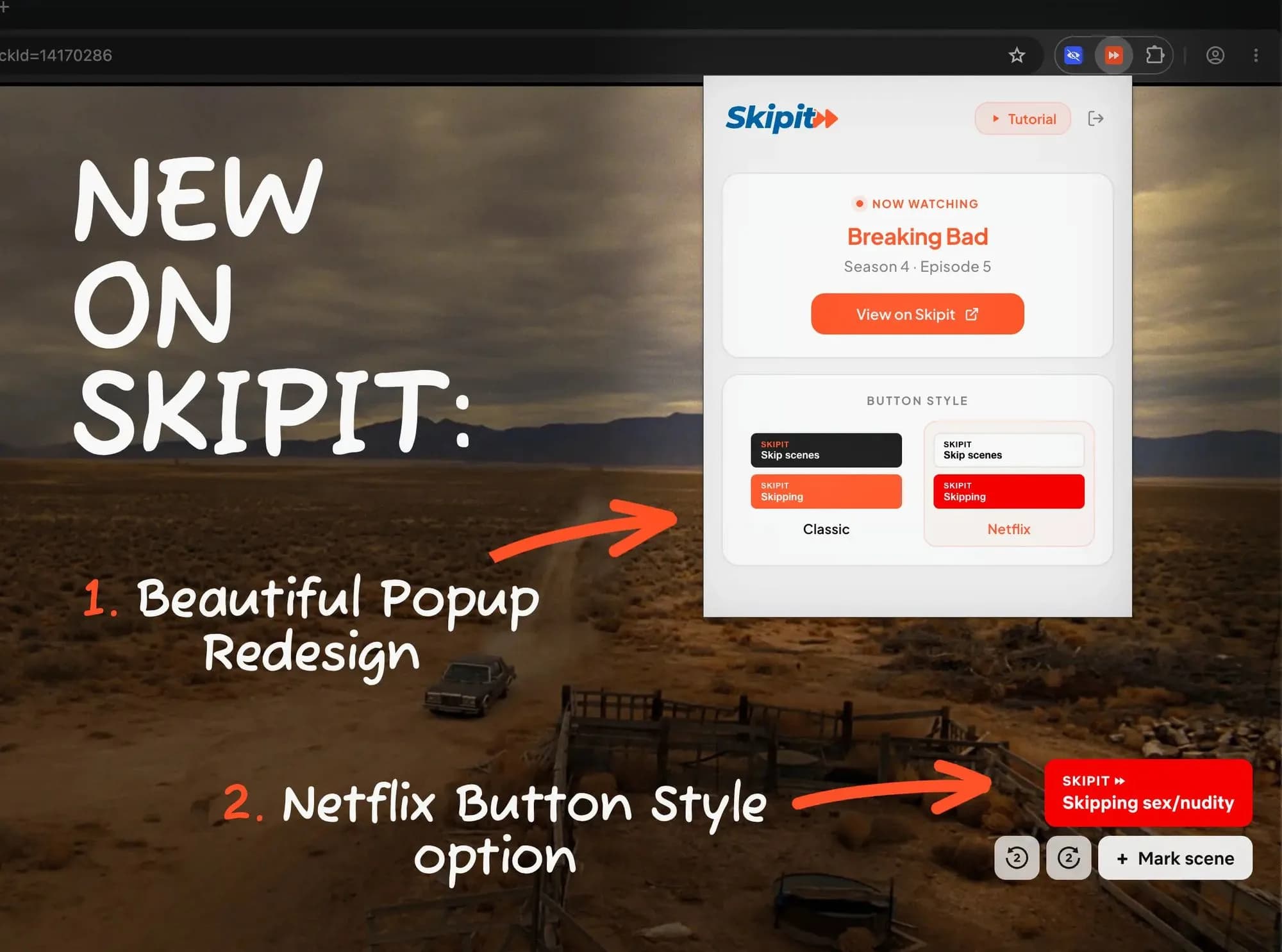
A redesigned popup and your choice of button

The redesigned Skipit popup showing what you're watching, next to the new Netflix-style skip button

  • A redesigned popup that shows what you're watching at a glance.
  • Choose your button style: the classic Skipit look, or one that blends in with Netflix.
  • Easier setup: Skipit opens the sign-in page for you right after you install it.
  • Cleaner, shorter labels when you're skipping more than one category.
  • The skip button now shows up on Netflix's pre-play screen too.
  • Behind-the-scenes upgrades for a more reliable sign-in.

Free tools for Netflix fans

Skipit now has a set of free tools for anyone who watches Netflix, no account needed.

Skipit on your phone

The whole web app now works beautifully on phones and tablets: from your dashboard to every movie and show page. Look up a title from the couch before you press play.

Extensionv1.2.0

Pinpoint scenes with -2s and +2s

New -2s and +2s buttons in the player let you pinpoint exactly where a scene starts and ends when you mark it.

Our story, and how Skipit compares

  • A new About page with the story and values behind Skipit.
  • Honest comparisons with other content filters, so you can pick what's right for your family.
  • Faster pages and lighter images across the site.
Extensionv1.1.5

Small fixes and polish

  • Prompts asking you to confirm a scene now only appear when you're signed in.
  • The skip button is easier to spot on bright scenes.

See what's covered right from the homepage

  • A preview of the Skipit library on the homepage, so you can see which shows and movies are covered at a glance.
  • Answers to the most common questions, right on the homepage.
Extensionv1.1.4

Refreshed sign-in tutorial

A refreshed tutorial to help you sign in to the extension.

Extensionv1.1.3

Marking scenes respects your pause

Marking a scene no longer un-pauses a video you had paused.

Look up any title, no account needed

  • Title pages are open to everyone. Check what Skipit covers for a movie or show before you even sign up.
  • A friendlier page when an episode isn't available.
  • The Skipit blog is live, with guides on watching Netflix comfortably, parental controls and show-by-show content notes.
Extensionv1.1.2

Smarter title detection

Skipit is now much better at telling apart movies and shows that share the same name.

Extensionv1.1.1

Fewer unrecognized titles

Some titles were wrongly treated as unavailable on Netflix. They're recognized properly now.

Extensionv1.1.0

Help verify scenes while you watch

  • When a scene is waiting for review, Skipit shows it on the timeline and asks whether it's accurate, with a quick yes or no. The prompt gets out of your way on its own after a few seconds.
  • The skip button now tells you when a title isn't recognized yet, or when it's clean and needs no skips at all.
  • A refreshed skip button and voting design.
  • Skipit picks the right title more often when several share the same name.
  • The popup always gives you a next step, even when a title can't be recognized.

A better way to review community scenes

Every scene on Skipit is added and checked by the community. This update makes that process simpler and fairer.

  • A refreshed voting experience.
  • Click a scene on a title's timeline to jump straight to its details.
Extensionv1.0.3

Smoother skipping

  • Back-to-back and overlapping scenes are now handled seamlessly, with no flicker in between.
  • Scenes you mark show up in your skips right away.

Find something ready to watch

  • Ready to Skip: a new tab with every title the community has already covered.
  • Filter by skip status to see what's covered, what's clean and what still needs scenes from the community.
  • Clean titles are marked as such, so you know when a show or movie needs no skipping at all.
  • Episodes are grouped by season, with previous and next buttons to move through a show.
Extensionv1.0.2

Know what's in a title before you press play

  • See how many scenes of each kind a title has in the Skipit panel, before you press play.
  • The skip button now tells you what it's doing while it loads.
  • Bolder, easier-to-read scene markers on the Netflix timeline.
  • The popup now links to the right place: the title's page on getskipit.com while you watch, or the site itself while you browse.
  • Fixed the skip button forgetting which categories are available after you stop skipping.

A fresh look for getskipit.com

getskipit.com got a full redesign.

  • A new homepage that shows how Skipit works in a few seconds.
  • An animated Skipit logo.
  • Looks great on phones, tablets and desktops.
Extensionv1.0.0

Skip scenes automatically on Netflix

Version 1.0.0 of the extension includes:

  • Automatic skipping of nudity, sex and gore, with each category switched on or off on its own.
  • Skipit recognizes what you're watching by itself, down to the episode.
  • Mark scenes as you watch and share them with the community, so the next viewer is covered.
  • Upcoming skips appear right on the Netflix timeline.
  • Every Netflix tab works independently.